rfstool - allows you to access ReiserFS partitions from a Windows 95/98/ME/NT/2000/XP system. Starting with version 0.6, it even allows you to access ReiserFS partitions from Linux
* Do note that the for NT/2000/XP: You need administrative privileges to run this program. Normal users will probably not have the access rights to the raw partition data
* Access is read-only
* Journal data is ignored.
Showing posts with label Windows. Show all posts
Showing posts with label Windows. Show all posts
Tuesday, June 28, 2011

Reading Linux File System ext 2 or ext 3 from Windows

This freeware driver Ext2 Installable File System For Windows to be installed on Windows NT4.0/2000/XP/2003/Vista/2008 will mount ext2 file system as a separate drive letter. However permission may not be well handled due to Windows issue. To handle ext3, do read the FAQ found in the website
Monday, August 23, 2010
Deploying Big-IP LTM with Microsoft Remote Desktop Services
If you are deploying vwith Microsoft Windows Server 2008 R2 Remote Desktop Services, you will find these articles useful for the deployment......
For more information, read my blog Deploying Big-IP LTM with Microsoft Remote Desktop Services
For more information, read my blog Deploying Big-IP LTM with Microsoft Remote Desktop Services
Saturday, July 3, 2010
Using TestDisk to conduct emergency recovery for Linux and Windows
Testdisk by CGSecurity is a useful toolkit to help. According to the TestDisk Website,
Testdisk is very useful expecially if you are dual-booting from both Linux and Windows and if accidentally deletion. a few listed tutorial from a much larger list.
"TestDisk is a powerful free data recovery software! It was primarily designed to help recover lost partitions and/or make non-booting disks bootable again when these symptoms are caused by faulty software, certain types of viruses or human error (such as accidentally deleting a Partition Table). Partition table recovery using TestDisk is really easy.""In addition, it can
- Fix partition table, recover deleted partition
- Recover FAT32 boot sector from its backup
- Rebuild FAT12/FAT16/FAT32 boot sector
- Fix FAT tables
- Rebuild NTFS boot sector
- Recover NTFS boot sector from its backup
- Fix MFT using MFT mirror
- Locate ext2/ext3 Backup SuperBlock
- Undelete files from FAT, NTFS and ext2 filesystem
- Copy files from deleted FAT, NTFS and ext2/ext3 partitions. "
Testdisk is very useful expecially if you are dual-booting from both Linux and Windows and if accidentally deletion. a few listed tutorial from a much larger list.
Thursday, July 9, 2009
Using Putty, Xming to forward X11

If you are using Windows and you wish to forward X11 traffic to your windows. This is not a hard things. You need a couple of freeware
Step 1: At the Linux SSH Server
vim /etc/ssh/sshd_config
Ensure X11Forwarding yes
Step 2: Download Freeware
At your Putty session,
- click on the host you wish to X11 forwarding
- Go to Connection > SSH > X11 > "Enable X11 forwarding" > X display location "localhost:0"
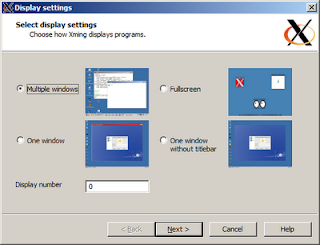
Step 3: Install XmingNote: Xming uses Microsoft's OpenGL renderer interface as standard. If your display is quirky, download and use Xming-mesa usually render most clients that uses OpenGL
After installation of Xming or Xming-mesa
- Launch Xming before you use SSH to forward X11
Friday, April 17, 2009
Personal PBS
Personal PBS 10.0, a free turney application that leverages multi-core CPU Technology to easily transform any Desktop Computer into a minature compute farm or cluster system.
See Personal PBS Website
Personal PBS helped to turn normal fesktop into a minature compute farm, allowing you to access the added power of today's multi-core desktops by queuing up and running complex job in the background, using idle compute cycles, wothout interfering with your normal activities.
See Personal PBS Website
Personal PBS helped to turn normal fesktop into a minature compute farm, allowing you to access the added power of today's multi-core desktops by queuing up and running complex job in the background, using idle compute cycles, wothout interfering with your normal activities.
Thursday, March 26, 2009
Xming, X Windows Server for Microsoft
Use this tools very often when I'm using a Windows OS and need a X Windows to my LINUX Server
Xming is the leading free unlimited X Window server for Microsoft Windows (XP/2003/Vista). It is fully featured, small and fast, simple to install and being standalone native Microsoft Windows, easily transported portable as a Pocket PC X server.
At the download page, download the Xming-mesa instead of Xming. Most versatile so far....
Xming is the leading free unlimited X Window server for Microsoft Windows (XP/2003/Vista). It is fully featured, small and fast, simple to install and being standalone native Microsoft Windows, easily transported portable as a Pocket PC X server.
At the download page, download the Xming-mesa instead of Xming. Most versatile so far....
Monday, December 1, 2008
Avidemux Video Editor
Avidemux is a free video editor designed for simple cutting, filtering and encoding tasks. (URL: http://fixounet.free.fr/avidemux/) . Available for Windows, LINUX, MAC OS
Subscribe to:
Posts (Atom)
